Published 4 November 2026
Product passport after purchase: cost to channel
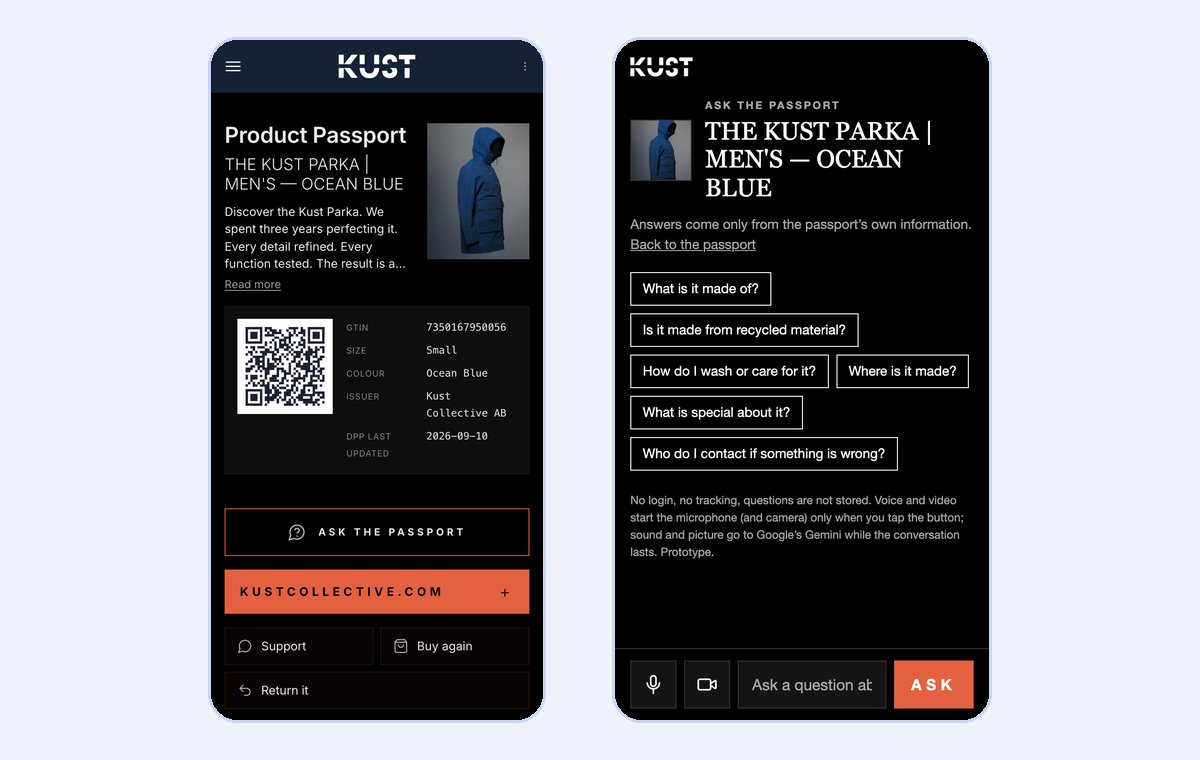
A Digital Product Passport has to exist for a product to be sold, and Oxera's report of 2 November 2026, commissioned by Amazon, counts what that costs. But the product passport is also the page a customer reaches when they scan the code on the product, often long after they bought it. With DPP Agent and Blippa, the product passport after purchase sits on the brand's own address, in the brand's own look, and carries services: Ask the passport, repair and spare parts, returns, resale, buy again, support, care advice and assembly instructions. The same passport that compliance requires becomes a point of contact that gives the brand something back.
This article is for brands that have to produce product passports and want to know what they can get from them beyond meeting the requirements. It covers what the report counts, what the passport can do after purchase, and which services exist today.
What Oxera's report counts
The report, Assessment of costs associated with enabling Digital Product Passports in the EU, is about what it costs companies to produce and run passports. Staff is the item the report considers best supported: the detergent-sector study assumes 0.5–5 additional full-time positions per company, depending on the number of products and how often they are updated. Recurring fees for an external passport service are judged to be low and not the main cost. The expensive parts are the work on data and the project needed to get started.
For the benefits, the report uses the Commission's impact assessment for toys. On those figures, the benefits are 1.6 times the costs. A 20% rise in recurring costs brings the ratio down to 1.3.
The report also says what the passport can do for consumers. In section 6.4, Oxera writes that passports will not generate substantial value if they function merely as a compliance repository, and that what the consumer meets must provide genuine utility, for example by enabling repair or recycling. Section 6.5 says the passport can open a new channel of communication with consumers, with offers for replacement products, add-on services and directions to recycling. But it is described as a potential benefit that depends on how digitally mature the firm is, and it is not part of the 1.6 ratio, which rests on the Commission's figures. In the report's calculation the cost is counted in full, while the channel stands as a possibility. This article is about that possibility.
The requirements and the address are the same. The services are added to the same passport.
The passport is the brand's own page after purchase
The customer already has a right to the passport. Under Article 11(b) of the Ecodesign for Sustainable Products Regulation (EU) 2024/1781, customers, repairers, refurbishers and recyclers shall have free of charge and easy access to the passport. Under Article 7(2)(b)(ii), the information requirements for a product group can cover how to install, use, maintain and repair the product, and how to return or handle it at end of life. So the passport has to be there and readable by the customer. The question is what the customer finds there.
When the customer scans the code, the passport opens on the phone, with no app. In DPP Agent the passport sits on the brand's own domain, for example dpp.yourbrand.com, with an address under GS1 Digital Link. The page has the brand's colours, typefaces and buttons. The address belongs to the brand, not to us, so the code can stay on the product for years.
Each service in the passport can be shown before purchase, after it, or always. The QR codes DPP Agent prints say where they sit: the code on the hang tag is read in the shop, before purchase, and the code on the sewn-in care label is read at home, after it. So the size guide and in-store stock can show from the hang tag, and repair, returns and resale from the care label.
dpp.example.com/01/…The passport on the brand's addressin the brand's colours, type and buttonsThe services also appear in the passport's machine-readable links, with GS1's registered link types where one exists, such as gs1:serviceInfo for repair and gs1:registerProduct for registering the purchase. A till or a workshop system can then find them without an integration of its own.
The services in the passport
Ask the passport
The customer asks a question about the product and gets an answer from the passport's own data, by text, voice or video. The answer rests only on what the passport says. When the answer is not there, the assistant says so and points to the brand's website or contact details. The suggested questions are chosen from what that particular passport can answer, such as material, care and where the product was made. Questions are not stored and the customer does not log in.
Repair, spare parts and returns
The repair button opens the brand's own repair service, with article, colour and size filled in from the passport. The brand can add a step before it, in which the customer photographs the damage and the label and gets help to send a complete request. The product details always come from the passport, never from the AI. Spare parts is a button of its own to the brand's spare-parts shop, in any category, from a jacket's buckles to a battery's modules. Returns opens the brand's returns portal for that product.
Warranty and claims are handled in the brand's own systems, and the passport leads there. A button to register the purchase and one for support go to the brand's own pages, and Ask the passport answers who to contact when something is wrong, from the passport's contact details. For furniture and watches the warranty period can be in the passport.
Resale and buy-back
Sell it leads to the brand's own second-hand channel: its own pre-loved shop, a buy-back or trade-in programme, or a platform the brand works with. More sales channels can be added in the order the brand chooses, with its own channel first. For clothing, the passport can show an estimated resale value from Bencha, based on the condition the owner chooses. The value is shown with its source and is never a price offer or part of the passport data. For watches there is a button to sell or trade in.
Buy again, support and news
Buy again leads to the same product in the brand's web shop, in the right size and colour, and the button turns grey when the variant is out of stock. Support goes to the brand's contact page. The customer can sign up for the newsletter straight from the product, and with Klaviyo, Mailchimp, Brevo or Rule connected the address goes directly to the brand's list. The passport can also ask how satisfied the customer is, with one tap. Only the rating is kept, nothing about the person, and the brand sees the ratings per product.
Care advice and assembly instructions
Care advice is shown for that particular product, with the ISO symbols, and the same text is used on the passport and on the label. Assembly instructions are shown step by step: the passport opens the manufacturer's own instructions one page at a time, the parts first and then the steps, and where the build forks the customer picks their version. The pages are the manufacturer's own drawings. No step is rewritten in words, since such a text would be data nobody has checked.
| Service | The customer | The brand |
|---|---|---|
| Ask the passport | Gets answers about the product from the passport | Fewer questions to customer service |
| Repair | Sends a request with the right product details | Complete cases in its own repair service |
| Spare parts | Finds parts for their product | Spare-parts sales |
| Returns | Starts the return for the right product | Returns through its own portal |
| Sell it | Sells the product on | Second-hand business in its own channel |
| Buy again | Buys the same product again | Sales in its own web shop |
| Newsletter and rating | Signs up and gives a rating | Subscribers and ratings per product |
| Care and assembly | Looks after and builds the product correctly | Fewer questions about care and assembly |
What the passport should not carry
The passport is open to anyone who scans it and needs no login. Anything about a person, such as owner details, accounts and history from other systems, does not belong there. It lives in the brand's own systems or in Blippa services, beside the passport. There the owner can, for example, log in, pass the ownership history on when the product is sold, and get a message if someone finds a lost jacket, without the passport changing. Where the line runs is on the page about the services in the passport and Blippa services.
The cost and the requirements
What decides whether a passport meets the requirements is the same with or without services: an address under GS1 Digital Link, machine-readable data, version history, and a back-up copy with a service provider, as ESPR requires in Article 10(4). How the report's cost items, staff, development and data, look in DPP Agent is covered in a separate article among the news on dppagent.com. An existing passport, including one from another provider, can be checked in the validator, which shows field by field what is there and what is missing. The basics, such as what a passport is and who sees what, are covered in DPP Academy.
Checklist for the brand
- Put the passport on an address under your own domain and place the code where the customer finds it after purchase too, for example on the care label.
- Connect the services you already have for repair, returns and resale, so the buttons lead there.
- Decide which services show before purchase and which after.
- Switch on Ask the passport and check that the passport holds what customers ask about: material, care, origin and contact.
- Add care advice and, where needed, the manufacturer's assembly instructions.
- Keep personal data out of the passport, in your own systems or in Blippa services.
- Follow the scans and the ratings, and adjust the services to what customers use.
More passports with services are among the examples. To see your own products as passports, book a walkthrough.
Frequently asked questions
What is a product passport after purchase?
The same Digital Product Passport that EU rules require, seen from the customer's side: the page that opens when the customer scans the code on the product. In DPP Agent it sits on the brand's own address and can carry services such as repair, returns, resale and buy again.
What does Oxera's report say about the benefit for the brand?
The report mainly counts costs. Section 6.5 says the passport can open a new channel of communication with consumers, but as a potential benefit that depends on the firm's digital maturity. It is not part of the report's benefit-cost ratio of 1.6, which rests on the Commission's figures for toys.
Which services can a product passport in DPP Agent carry?
Ask the passport, repair, spare parts, returns, sell it, buy again, support, purchase registration, newsletter, rating, care advice and step-by-step assembly instructions. Each service can be shown before purchase, after it, or always.
Does the resale value apply to every product?
No. The estimated resale value from Bencha applies only to clothing today. The Sell it button, which leads to the brand's own second-hand channel, works for every category.
Does the product passport collect personal data?
No. The passport is open, needs no login and does not store the customer's questions. Anything about a person, such as accounts and owner details, lives in the brand's own systems or in Blippa services.